
Module 21 Certification pending
Four delivery platforms, one connection, on the same till.
Talabat, Deliveroo, Careem and noon, through UrbanPiper, on the same till and the same kitchen screen. Coming soon, pending certification with UrbanPiper; once certified, our team connects your stores for you during setup.

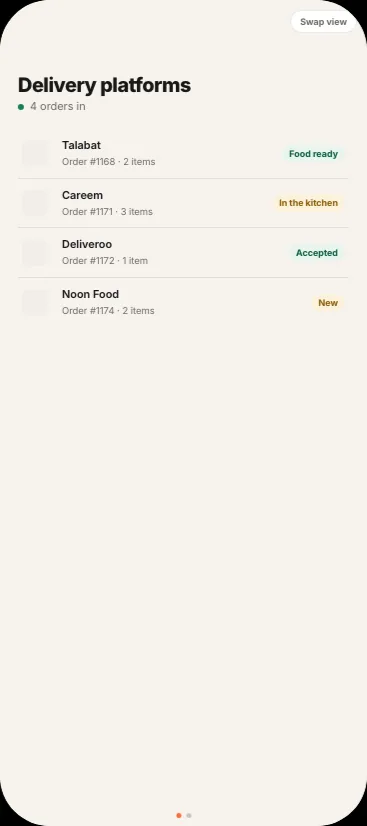
Delivery platforms
Talabat
How an order moves
In, cooked, sent back, paid.
- 01Order in
A platform order lands on the till with its kitchen ticket.
- 02Cooked#1168 Talabat2 items#1171 Careem3 items
It sits on the same kitchen screen as the dine-in orders.
- 03Status backAcceptedFood readyPicked up
Accepted, food ready and cancelled go back to the platform.
- 04Paid outOrders1,240.00Payout1,240.00Pay
The payout report is matched against your own orders.
What is in it
Delivery platforms, feature by feature.
It will cover the apps UAE guests order from, Talabat, Deliveroo, Careem and noon, through UrbanPiper. Coming soon, pending certification with UrbanPiper; once certified, our team connects your stores for you during setup.
Orders in
A platform order arrives on the till as an order like any other, with its kitchen ticket, and settles against that platform’s own payment type.
Go busy
Pause an outlet on the platforms when the kitchen is under water, and resume it from the same screen.
Go busyStatus back
Accepted when the order lands, food ready when the kitchen marks the last line, and a cancellation on the platform cancels it here.
Status backMenu and availability out
The menu is pushed with per-platform prices, markup and rounding, and an item marked off at the till is taken off every platform.
Your own riders
Assign your own riders to your own delivery orders, see each one out and delivered, and settle their cash on delivery into the drawer. A rider app is coming soon.
Exceptions, not silence
A line that does not match an item on your menu waits in an exceptions queue rather than disappearing.
Payouts matched
The platform’s payout report is matched against your own orders, on the settlement page.
Payouts matchedTheir side of it
What the guest sees.
Watch it done
Delivery orders on the till, in 28 seconds.
Recorded on delEat itself, with a demo restaurant. The captions are in the picture, so they work with the sound off.
The steps
- Open Online orders. Every platform lands on one board.
- Each order shows its platform, its number and its total.
- Orders move along as they are accepted, made and sent out.
- Move each order on: Ready when the bag is packed, Dispatched when the rider leaves.
- The kitchen sees the same orders, with the platform and the brand on each ticket.
All 42 are in the Academy, in the order to watch them.
Before you believe it
The two questions everyone asks.
How do we get connected?
Through UrbanPiper, once its certification of delEat is complete, which is coming soon. Our team then connects your stores for you during setup. Online brands are billed per connected store, so nothing is charged before a store is connected.
Which platforms?
Talabat, Careem, Deliveroo and Noon Food, all through UrbanPiper on the one till, once certified.
Pricing
One price per outlet. No cut of your sales.
Plans from AED 149 per outlet per month on a 2-year term. Thirty days free, no card.
See pricingThirty days free
Start on everything that is live today.
No card. Delivery platforms is certification pending; the rest of the product is yours for a month.